
Portfolios and Pages at the top
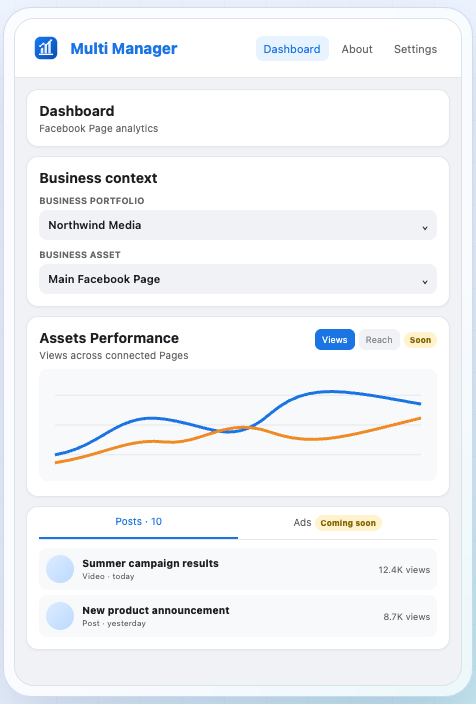
Two dropdowns switch between Business portfolios and their connected Pages. No menu diving.
FB Multi Manager puts your Business portfolios, recent post metrics and post-level audience data into a Chrome side panel that sits beside the Facebook tab you already have open. We went through every screen.
Uses the Facebook session you are already signed into · 16 languages
4.9/5
Highly recommended
The fastest route we have found to Facebook Page and post analytics without opening Meta Business Suite. The panel is read-only for now, so it will not suit anyone who wants to manage ad campaigns from the same place — but for reading the numbers, it removes a genuinely annoying amount of clicking.
Anyone who looks after several Pages knows the routine. You want to know how yesterday's post did, so you leave the tab you are working in and start navigating.
The portfolio and Page dropdowns sit at the top of the panel, so the step that normally costs the most clicks is the first thing you see.
The dashboard is organised the way you would check things manually — in descending order of how often you need them.
Two dropdowns switch between Business portfolios and their connected Pages. No menu diving.
Views, viewers, interactions, reactions, comments, shares, saves, follows and link clicks.
Daily view performance across connected Pages on a single set of axes.
Performance over time, follower split, age and gender distribution, leading countries.
Create a post, ad, Reel or Story in Meta's own interface instead of a copy of it.
Follows your browser language and remembers a manual override.
No API keys, no new account, no data migration. The extension works with the Facebook session you already have.
Install from the Chrome Web Store. There is nothing to configure afterwards.
Keep working in your Facebook tab and open the panel beside it. Your existing session is used locally.
Recent posts, audience insights and performance trends load right there, ready to read.
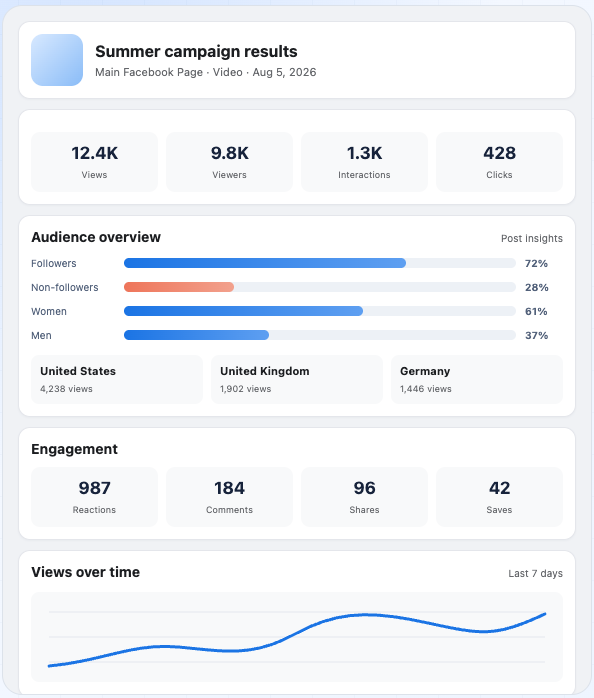
Opening a single post is the part we kept coming back to. Instead of the usual handful of vanity counters, you get the breakdown that actually explains a result.
The follower and non-follower split is the number most people never bother to dig out of Business Suite — and it is the one that tells you whether a post travelled beyond your existing audience or simply recirculated among people who already follow you.
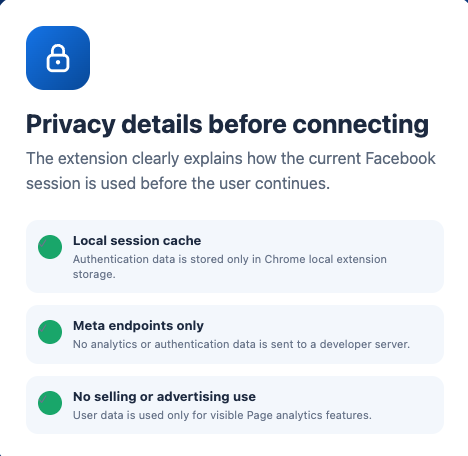
This is the question worth asking of any extension that touches a logged-in Facebook session, so we read the store disclosures rather than taking the marketing at face value.
Our overall score is the average of five categories. The spread matters more than the headline number: this is a narrow tool that is close to perfect at its narrow job.
Speed of access
5.0
Depth of post data
5.0
Privacy posture
4.9
Setup effort
5.0
Feature breadth
4.6
The extension is not a replacement for Business Suite and does not claim to be. It is a faster front door to the things you look up most often.
| Task | Meta Business Suite | FB Multi Manager |
|---|---|---|
| Switch portfolio and Page | Several menu levels | Two dropdowns at the top |
| Read recent post metrics | Open Insights, then the post | Already in the post list |
| Follower vs non-follower reach | Available, several clicks deep | On the post screen |
| Compare several Pages at once | Not in a single view | One chart |
| Stay in your current tab | No | Yes, side panel |
| Create a post, ad, Reel or Story | Full native editors | Hands off to Meta |
| Manage ad campaigns and budgets | Yes | Not in this release |
We installed version 1.0.1 from the Chrome Web Store and worked through the panel beside a live Facebook tab, moving between portfolios, Pages and individual posts. Every factual claim on this page — version, size, languages, data handling — was checked against the store listing and the developer's privacy disclosures. The category ratings are our own editorial judgement, not an average of user reviews: version 1.0.1 shipped in August 2026 and has not accumulated public ratings yet.
Yes. The Chrome Web Store listing shows no in-app purchases and no subscription.
No. It works with the session you are already signed into in the browser. Authentication data is cached only in Chrome's local extension storage.
Not in this release. Advertising management is marked as coming soon inside the interface. You can jump from the panel into Meta's own ad creation flow.
It is published for Chrome and uses the Chrome side panel. There is no Firefox or Safari build listed.
The comparison chart is built for several connected Pages at once, drawn from the Business portfolios your account has access to.
The download is 331 KB, which is small for an analytics extension, and the panel renders separately from the Facebook page itself.
Free, 331 KB, and nothing to configure after installing.
Version 1.0.1 · Updated August 2026 · Chrome side panel
FB Multi Manager
Rated 4.9/5 · Free