
FB Multi Manager side panel
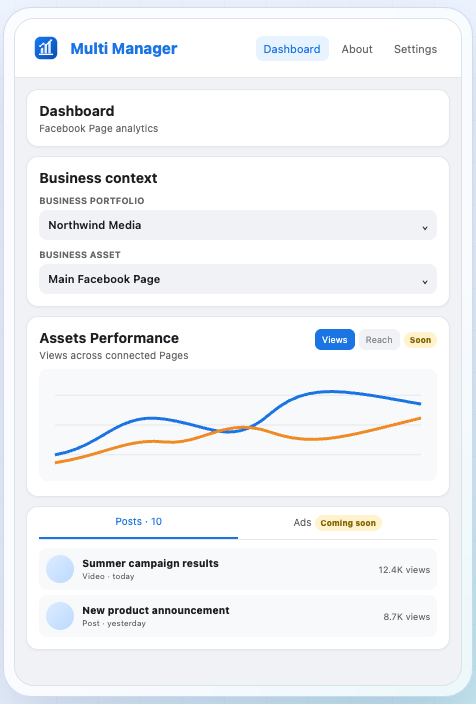
A Chrome extension that opens beside your Facebook tab. Portfolios and Pages at the top, recent posts with nine metrics each, and audience breakdowns per post. Read-only.
Built for checking numbers while you work.
Meta Business Suite, the Page's own Insights tab, or a Chrome side panel beside the tab you are already in. We put the same twelve questions to all three and timed how far you have to navigate for each answer.
FB Multi Manager · Free · 331 KB · Rated 4.9/5 in our review
These are not three versions of the same product. Each was built for a different moment in the working day, and that is what decides which is faster.
A Chrome extension that opens beside your Facebook tab. Portfolios and Pages at the top, recent posts with nine metrics each, and audience breakdowns per post. Read-only.
Built for checking numbers while you work.
Meta's full management console. Publishing, scheduling, inbox, ads, billing and reporting for every asset a portfolio owns. Everything is in there somewhere.
Built for doing the work, not glancing at it.
The Insights tab on the Page itself, or the Professional dashboard. Quick for the Page you happen to be looking at, and only that Page.
Built for one Page at a time.
Twelve things a Page manager looks up in a normal week. A tick means it is right there; a cross means you are not getting it from that tool at all.
0/12
Side panel
Every analytics task
0/12
Business Suite
Publishing, ads, exports
0/12
Page Insights
Never the fastest route
| What you want to know | Side panel | Business Suite | Page Insights |
|---|---|---|---|
| Without leaving your current tab | Yes | No | No |
| Switch between Business portfolios | Dropdown at the top | Several menu levels | Not applicable |
| Switch between Pages | Dropdown at the top | Asset switcher | Leave and open the other Page |
| Recent posts with full metrics in one list | Nine per post | Open Insights, then the post | Per post, one at a time |
| Follower vs non-follower reach on a post | On the post screen | Several clicks deep | Several clicks deep |
| Age and gender split on a post | On the post screen | In post insights | In post insights |
| Top countries on a post | On the post screen | In post insights | In post insights |
| Compare several Pages on one chart | Yes | Not in one view | No |
| Publish or schedule a post | Hands off to Meta | Yes | Yes |
| Create an ad, Reel or Story | Hands off to Meta | Yes | Partly |
| Manage campaigns, budgets and billing | Not in this release | Yes | No |
| Export a report to a spreadsheet | No | Yes | No |
The single most common question in Page management, and the clearest illustration of the difference between the three.
Native Page Insights sits between the two: fast if you are already on the right Page, no help at all if you are not.
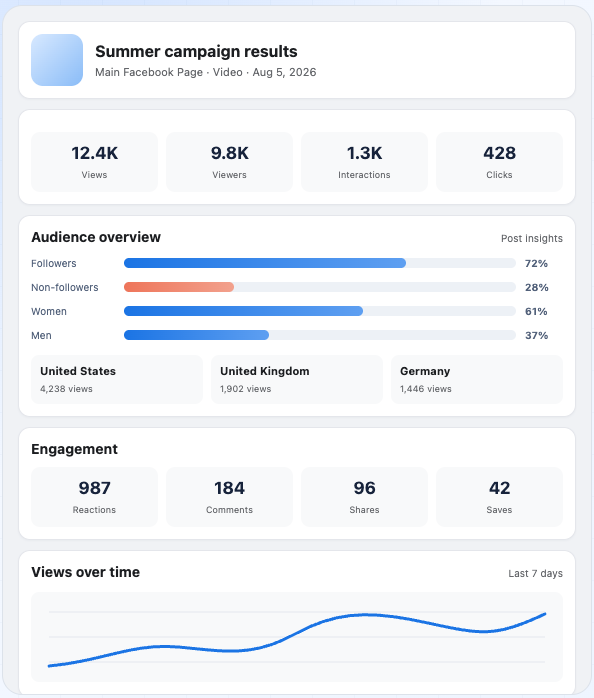
All three tools will tell you how many views a post got. The difference is what happens when you want to know who those views came from.
In the side panel, opening a post gives you performance over time, the follower and non-follower split, age and gender distribution, and the countries driving views on one screen. In Business Suite and native Insights the same data exists, several clicks deeper, one post at a time.
Business Suite is where you do the work. The side panel is where you check it. Trying to make one tool do both jobs is why people end up with fifteen tabs open.
If you run several Pages and check performance daily, the panel handles the routine and you drop into Business Suite when you need to publish, buy or export.
One Page, checked once a week, and most of your time spent publishing rather than analysing. An extra extension will not pay for itself.
Agencies and social teams moving between client portfolios all day. Not losing your place is worth more than any single feature.
No. It is read-only analytics. Publishing, campaign management, billing and exports stay in Meta's own interfaces, and the extension links out to them rather than reimplementing them.
No. It uses the Facebook session you are already signed into in the browser. There is no account to create and no API key to paste.
Authentication data is cached only in Chrome's local extension storage, and analytics requests go only to Meta-owned HTTPS endpoints. Per the developer's declaration, nothing is sent to a developer-operated server, sold on, or used for advertising.
No. The Chrome Web Store listing shows no in-app purchases and no subscription.
No. It is published for Chrome and uses the Chrome side panel, which Firefox and Safari do not provide in the same form.
The extension's details come from its Chrome Web Store listing as of August 2026. Meta changes Business Suite and Page Insights regularly, so treat the navigation steps as accurate at the time of writing rather than permanent.
Free, 331 KB, and nothing to configure after installing.
Version 1.0.1 · Updated August 2026 · Chrome side panel
FB Multi Manager
Rated 4.9/5 · Free